
After updating to Windows 10 some users complain about Windows 10 stuck on the loading screen after Fall Creators Update. The blue Windows 10 logo shows the spinning dots each time when you turn on your PC. Besides that Windows 10 also keeps on freezing on the loading screen. This hang actually haunts the Windows users and is very disturbing as well. Numerous users have got trapped in this Windows 10 stuck on loading screen error. So if you are one of them and finding the solution to fix the error then you have landed on the right page.
Causes of Windows 10 stuck on Boot Logo
- Faulty or incompatible drivers.
- Incorrect system configurations
- Corrupted files
Method to fix Windows 10 Stuck on Loading Screen
There are certain methods that can help you get rid of the error. Follow them and your problem will be gone.
Also Read: Fix Blue Screen after Windows 10 Fall Creators Update
Method 1- Enable “No GUI Boot” in System Configuration
Step 1- Enter Windows Safe Mode
- Hold the power button to turn off your PC > O again.
- Repeat the turn on and turn off for 3 times until you see the recovery screen.
- Go to advanced repair > Troubleshoot.
- Choose Advanced options >Startup Settings > Restart.
- Press key F5 for Safe Mode.

Step 2- Check for “No GUI Boot”
Open Run and type msconfig > ok.

In System Configuration navigate to the Boot tab.
Check the No DUI boot option.Click on Apply > Ok.

Reboot PC and it’s done.
Method 2- Repair Drivers
Step 1. Uninstall Graphics Driver
Right-click on the start menu.
Select the Device Manager.
Then expand the Display adapter’s entry > find driver> Right-click to Uninstall.

Step 2. Disable Automatic Driver Install
Open Run > gpedit.msc > Enter.

Go to Computer Configuration > Administrative Templates.
Click to expand System, and then Device Installation > Highlight the Device Installation Restrictions.
Click Prevent installation of devices > Choose the Enable.
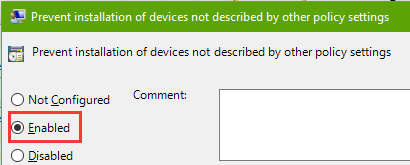
Then click on Apply and then finally hit the OK button to save the changes made.
Method 3- Install Drivers using Driver Talent
Driver Talent is one of the most intelligent driver update tools that allows users to download and update all the drivers. Download it > Install it > scan now and click on update all or download.
That’s it for now folks. These were few methods that you can hit to fix the Windows 10 stuck on the loading screen after fall creators update error.