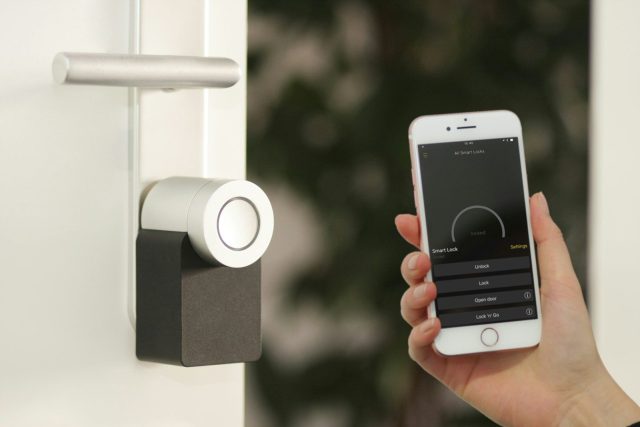
A smart access control system replaces a mechanical lock and buzzer with a credential reader, an electrified door lock, and a controller that records who came in and when — swapping a physical key for a fob, code, or phone credential. The reader is the part everyone notices, but the door, the frame, and the wiring behind it decide whether the system actually works long-term.
What Is a Smart Access Control System?
A smart access control system is a set of connected hardware — a credential reader, a controller, and an electrified lock — that decides whether a specific door opens for a specific person, and keeps a record of that decision. Instead of a key that opens any lock it fits, each credential (a fob, a PIN, a phone app, or a card) is tied to a specific door and a specific schedule inside the controller’s software.
In a multi-tenant building, that controller usually shares its low-voltage backbone with the building’s intercom — panels like Comelit, Aiphone, or ButterflyMX handle visitor calling and video, while the access controller handles resident entry. They’re separate functions running on the same wiring closet.
Why It Matters for Anyone Managing a Building
The appeal isn’t just convenience — it’s that a lost key doesn’t compromise the whole building anymore. Deactivate one fob or app credential and that person’s access is gone in seconds, with no rekeying, no locksmith visit, and no guessing who still has a copy of the old key. Cloud-managed systems also generate a log: which door, which credential, what time. That log is the first thing an insurance company or a co-op board asks for after an incident, and it doesn’t exist with a mechanical lock.
How the Hardware Actually Works
The Reader and Controller
The reader itself does almost nothing — it reads a credential and passes a signal to the controller, which checks that credential against its permission list and decides whether to release the lock. Some controllers store that permission list locally on a board inside the building; others check against a cloud account over the building’s internet connection. The distinction matters more than most spec sheets admit: a local controller keeps working if the internet goes down, but revoking a fob usually means physically reprogramming that board. A cloud controller lets a property manager revoke access from a phone, but the door depends on the building’s internet uptime.
The Door Itself Is Part of the Circuit
This is the part that gets skipped in a lot of installation quotes. An electrified strike or maglock has to sit flush against a squared door and frame to release cleanly — if the frame has racked or the door has warped, the lock will bind, buzz, or fail to release even when the reader logs a valid credential. In older walk-ups the frame has usually shifted enough over the decades that no strike plate sits flush anymore. At that point the job isn’t a reader upgrade — it’s a door access system installation in NYC that starts with a new door and frame, and the electronics go back in afterward, not the other way around.
Wiring and Power
Every reader, controller, and lock on the system runs on low-voltage DC power, usually pulled from a central power supply rather than each door having its own transformer. That supply needs a battery backup sized to the building’s fire code requirements, because an access-controlled door still has to open during a power outage on a means of egress — which is a separate design decision from just keeping the lock powered.
Practical Steps for Getting This Right
- Audit the doors before the electronics. Check every frame and door slated for a reader — squareness, hinge condition, whether it’s fire-rated — before ordering hardware.
- Decide fail-safe or fail-secure per door, not for the whole building.
- Pick local or cloud-managed control based on who needs to revoke access and how fast.
- Plan the backbone, not just the door. Wiring runs, power supply capacity, and battery backup sizing all have to be worked out before install day, not during it.
- Bring in a specialist for the reader and wiring. A property manager comparing quotes should hire an access control installation nyc specialist who walks every door before pricing the job, not one who prices the reader off a spec sheet alone.
Common Mistakes Building Owners Make
- Fail-safe vs. fail-secure gets decided by habit, not by door. A fail-safe lock unlocks on power loss (required on most fire egress doors); a fail-secure lock stays locked on power loss (common on secondary or storage doors). Wiring an egress stairwell door fail-secure is a life-safety violation, not just an inconvenience — and it’s an easy mistake when one contractor wires every door on the job the same way.
- Treating the reader as a retrofit onto existing hardware. A reader bolted onto a decades-old strike plate will pass a demo and then fail intermittently once the building settles or the weather changes.
- No plan for a lost or dead credential in the field. Fobs get lost, phones die, apps need updates — every door needs a manual override path that doesn’t depend on the network being up.
- Ignoring the intercom-to-access-control handoff. If visitor calling and resident access run on separate systems that don’t talk to each other, someone ends up walking downstairs to buzz in a guest anyway — which defeats the point of installing either system.
Here’s how the two approaches actually compare once they’re installed and running:
| Traditional Buzzer/Intercom | Smart Access Control | |
| Credential | Physical key + buzzer call | Fob, code, or phone credential |
| Revoking access | Rekey the lock | Deactivate the credential remotely |
| Audit trail | None | Timestamped entry log |
| Power outage behavior | Mechanical lock unaffected | Depends on fail-safe/fail-secure wiring + battery backup |
| Visitor entry | Resident buzzes in from intercom | Same, plus optional remote unlock from a phone |
FAQ
Can I add access control to an old intercom system without rewiring the whole building? Often yes, if the existing low-voltage backbone has spare capacity and the panels can share a wiring closet. An installer needs to check existing wiring gauge and available power before quoting, not just the door count.
What happens to an access-controlled door if the power goes out? It depends entirely on whether that door is wired fail-safe or fail-secure. Fire egress doors are required to unlock (fail-safe); secondary doors are often wired to stay locked (fail-secure) until power returns.
Do I need a permit to install an electrified door strike in NYC? Electrified locking hardware on a means of egress typically falls under fire code review, and low-voltage electrical work should be done by a licensed installer who pulls any permit the job requires before work starts.
What’s the real difference between fail-safe and fail-secure locks? Fail-safe unlocks when power is lost; fail-secure stays locked. The choice is driven by whether the door is a fire egress path, not by preference — mixing them up on the wrong door is a safety issue.
Can tenants unlock the door with their phone instead of a fob? Yes, on systems built around an app-based or video intercom credential — the phone replaces the fob, but the building still needs the same wiring and power backbone underneath it.
The Part Nobody Quotes You For
Every access control quote leads with the reader — the brand, the touchscreen, the app. The part that actually determines whether the system works in six months is the door it’s mounted on and the power behind it, and that’s the part most quotes don’t itemize. Before signing off on any bid, ask the installer to walk every door on the list first. If they haven’t looked at the frames, they haven’t priced the job.