If you’ve ever scribbled down a verse and caught yourself imagining how it might sound when sung, you’re definitely not the only one. Lots of people write, but composing is a whole separate skill—and not everyone has the setup for that. This is where lyrics into song AI really earns its place. Type in your lyrics, hint at the vibe you want, and you’ll get a simple demo that makes your idea feel much more real.
Want to turn your lyrics into a song now? Give Media.io Lyrics to Song a try! It’s an all-in-one AI platform built for creators, packed with tools for music, visuals, and audio. Whether you’re new to AI songwriting or looking to speed up your creative workflow, Media.io keeps things easy, flexible, and honestly, a lot of fun.
What Is Lyrics Into Song AI?
Lyrics-to-song AI takes your written words and converts them into music. Instead of composing manually, you:
- Write prompts and paste your lyrics
- Pick a style
- Let the AI singing generator interpret your text
The system analyzes tone, rhythm, structure, and emotion, then produces an audio track that reflects your writing.
It’s helpful for:
- writers exploring melody ideas
- creators who want AI music for videos
- beginners learning how songs are shaped
- musicians prototyping draft versions
- anyone curious about AI-generated music
In short, lyrics-to-song tools remove the technical barrier between “I wrote something” and “I can hear it.”
Why Media.io Makes It Easy to Turn Lyrics Into a Song
Most AI song tools generate a quick melody and stop there. Wondershare Media.io works differently—it feels more like a lightweight production studio built on top of large AI models. Instead of giving you a single output, it supports the full creative cycle from rough lyrics to a shareable final asset.
Here’s how the platform improves each step of the process:
When you’re shaping the idea → the AI models help interpret your writing
You paste in a verse or chorus, and the system’s text-understanding model reads tone and emotion. A separate music model builds melody and rhythm that match your intent. This multi-model setup prevents the “random tune” effect that many basic AI song generators have.
When you need visuals → the 5000+ templates fill the gap instantly
Once you get your demo, chances are you’ll want artwork—maybe a cover, maybe a lyric card. Instead of opening another tool, Media.io gives you a full template library for music visuals, social clips, and promo graphics. You can build a consistent look for your song in a few clicks.
When you want a voice to present your lyrics → AI Talking Avatar steps in
If you want your lyrics “performed,” you can generate a talking avatar to deliver the lines. This works well for demos, pitches, or concept presentations. No mic, no studio—just type and animate.
When you want to expand the project → you have a multimodal workspace
Media.io isn’t only about music. You can move your song into:
- text-to-image for album art
- text-to-video for a short MV
- audio enhancement tools
- image-to-image for character artwork
This interconnected workflow makes it more flexible than standalone AI music tools.
When you’re just utterly uninspired → A Community-Driven Creative Library
The Explore section grows with each new user submission. Every video example is fully reusable—tap it, and the AI creates a matching version for you. When certain formats or aesthetics trend, Media.io sets up dedicated zones so creators can follow the momentum effortlessly.
When you’re just experimenting → free daily credits let you try everything
You don’t need a subscription to get started. Logged-in users receive daily free credits that work across music, image, video, and avatar tools. Great for testing songs or trying different genres before committing to anything.
How to Turn Lyrics Into a Song Using Media.io (Step-by-Step)
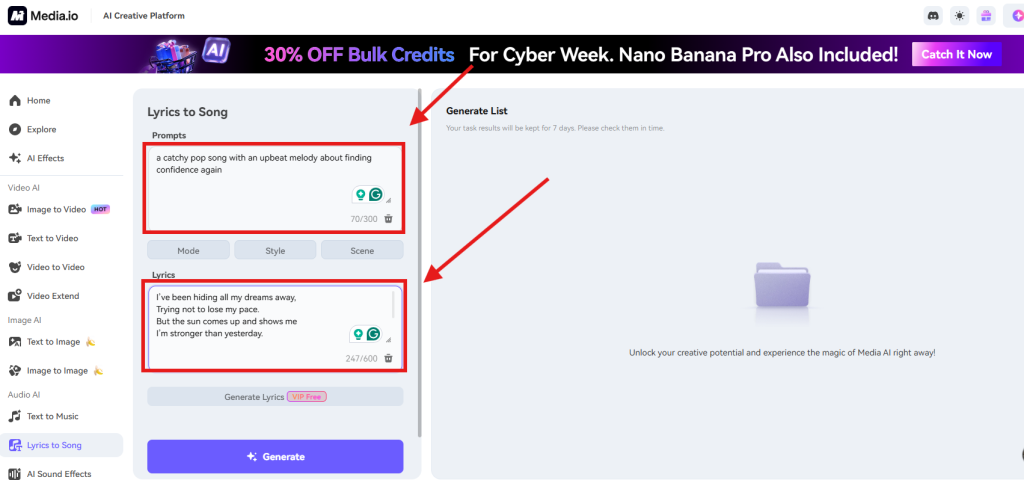
Step 1. Enter Your Lyrics and Text Prompt
Paste your lyrics and write a simple prompt such as:
- “gentle pop ballad about missing someone”
- “energetic rock chorus with hopeful tone”
- “soft emotional verse with piano and warm vocals”
Step 2. Choose Your Genre or Style
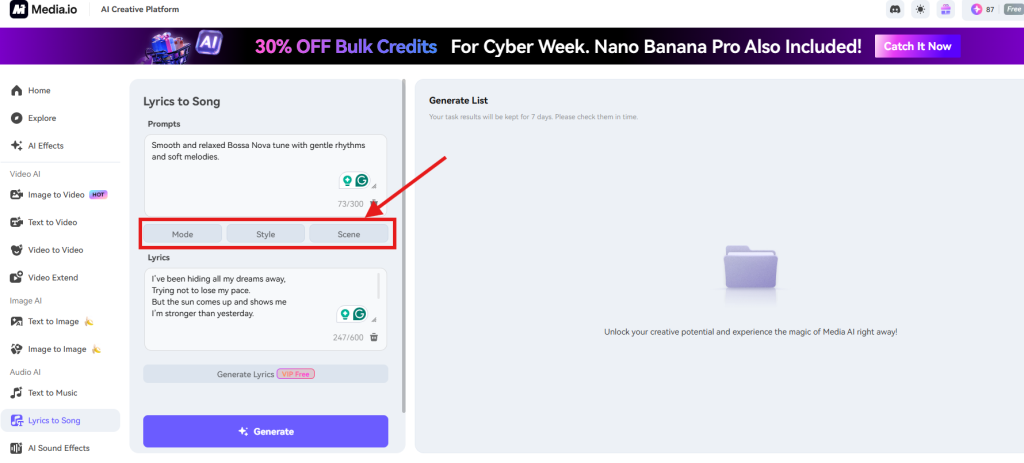
Don’t want to generate a prompt? Click Mode, Style, or Scene to generate a prompt until it meets your needs automatically.
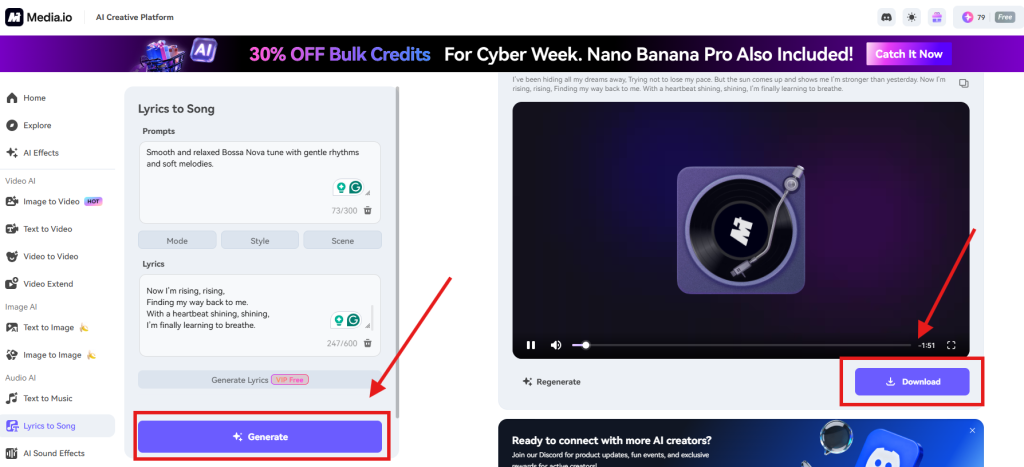
Step 3. Generate and Preview Your Song
Click Generate. In a few seconds, Media.io will produce a melody and structure based on your lyrics. You can listen, adjust, regenerate, or move the song into other creative tools.
What Can You Create with Lyrics-to-Song AI?
1. Quick Demo Songs for Lyricists
If you want to test your writing or explore melodic ideas, AI gives you a fast, low-pressure way to hear a demo. It’s ideal for early drafts or evaluating emotional tone.
2. Custom Music for Short Videos
Creators making TikToks, Reels, or Shorts can generate personalized background music that matches their visuals—no stock libraries, no licensing issues.
3. Concept Music for Creative Projects
Film students, podcasters, and designers can generate mood pieces or early concept tracks for storyboards, mood boards, and presentations.
FAQs about How to Use Lyrics to Song AI
Is Media.io an AI song generator free to use?
Yes—daily credits allow you to generate free songs.
Does the AI replace my lyrics completely?
No, it interprets and shapes them into a musical style.
Can Media.io work as an AI singer?
With the AI Talking Avatar, you can animate characters to perform your lyrics.
Final Thoughts
Using lyrics into song AI takes a lot of the pressure off. You don’t need instruments or software; you just type what you’ve written and let the system sketch a sound for it. Hearing your lyrics played back—even in a rough form—can clarify what works and what doesn’t, and it often pushes new ideas to the surface.
Media.io adds a bit of convenience by keeping everything in one place. Once the song is generated, you can try out visuals, test an avatar performance, or build a quick draft for a project without switching tools. It’s a simple setup, but it makes experimenting with music feel more approachable.