Ever wonder how to access the restricted data in Tumblr? Here you go, during this post, we’ll discuss a way to bypass the Tumblr safe mode. And also a way to bypass Tumblr safe mode on different devices.
Basically, Tumblr is a microblogging website, which is often termed be a mixture of Facebook, WordPress, and Twitter. Therefore it is easy to use, we are able to post gifs, Images, Texts, and Videos. Thus this is said to be individualistic compared to other social media platforms. It is just like every other social media platform there is no restriction to any particular kind of data its content varies from the silliest thing to globally debatable concerns.

The data can also be restricted and there is a policy of hiding data to be private. Its users now raised 475 million blogs on this website. Tumblr also has safe mode browsing for every user irrespective of their age limit. So, as mentioned above, to open the restricted blogs and NSFW, here I am going to tell different methods of how to Disable Tumblr Safe Mode.
How to Bypass Tumblr Safe Mode?
Likewise said before Tumblr goes to safe mode if it finds restrictive data. Tumblr pops up stating that “This Tumblr may contain sensitive media. Go back to Dashboard”.
As we know that Tumblr comes with the safe mode by default, so to enable this we need to follow the methods and steps properly to attain the bypass.
- Bypass with the Tumblr account
- Bypass without the Tumblr account
1. Bypass or Disable Tumblr Safe ModeWith Tumblr Account
Tumblr enables browsing in the website with or without account creation. So there are different methods for both of them. So, here, it deals with the users that hold the account. Since Tumblr can be operated in both desktop versions and also mobile versions, we have two methodologies.
1. Bypass the Safe Mode in Desktop version
The desktop mode enables a simpler option to turn off safe mode. Follow the steps here below.
- Launch the Tumblr app on your PC
- Sign in to your account and go to settings

- In setting, search for the filtration section
- You will find Tumblr safe mood On and off button.
- So, here turn off the switch.

2. Bypass the Tumblr in Phone
On Andriod devices, you can disable Safe Mode directly within the app itself. Follow the steps provided.
- Launch the Tumblr app.
- Go to the profile icon then select settings.

- Navigate to the Filter section.
- Now Toggle the Safe Mode button off.
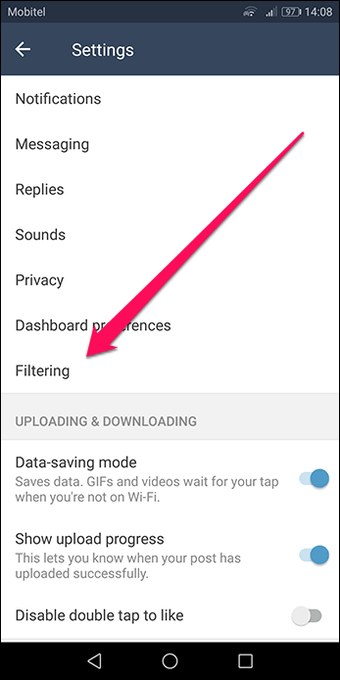
On an iPhone device, you cannot turn off Safe Mode within the app. You need to disable it from the device’s settings.
- Open the Settings app
- Scroll down the list of installed apps and select Tumblr.
2. Disable Safe Mode Without Tumblr Account
In this method, you don’t need to have a Tumblr account as mentioned above, here we will access sensitive data of Tumblr through other application like as follows:
1. Tumblr Imager Viewer

The Tumbler Imager Viewer is the basic user interface that allows searching for the names or hashtags. You can also view gifs and images also can enlarge them. Follow this link to the check website Tumblr Image Viewer.
2. TumbView

TumbView is comparable to Tumblr Image Viewer with a way more clean and modern computer programme. It allows you to look for Tumblr blogs, allows you to view the photographs as a slideshow, slideshow thumbnails, or as a grid. It’s very easy to navigate through and every one NSFW content is obtainable to look at.
3. Cascadr

The Cascadr may be a Tumblr image and photo viewer. It displays images in the Tumblr blog in a convenient tiled display. The images are efficiently auto-load as you scroll with a large read-ahead to reduce waiting times. Cascadr allows you to explore Tumblr by clicking through to a post’s previous re-blogger. It also allows you to re-blog a post.
4. Tumbex

This also ensures the Tumblr safe mode. However, it does have some pops up the screens showing up in the middle alerting about the restricted data.
5. GramUnion

GramUnion allows you to access all Tumblr blogs irrespective of restricted or unrestricted data. You just need to type in the search box accordingly. It also offers you other functionalities such as hashtags and options to filters posts.
Final Words
So I hope you like this post. May it solve your Online restrictions content problem on Tumblr. As per my knowledge, these are the different ways to bypass the Tumblr safe mode. If you are facing any issues during disabling safe mode in Tumblr, please don’t hesitate to mention them in the comments below. I would love to hear from you guys let’s make this interactive. Okay, we are going to end this now, thanks for reading the post, and don’t forget to comment below hope you are doing great! have a good day.