
Have you ever turned your attention to those money-counting machines in your bank and wondered, “What helpful machines they are, imagine the time it would take to count money by hand!”?
Just as automation has simplified everyday activities, modern software tools have transformed how professionals handle data-intensive tasks. If you are in need to converter OST file to PST format, in case of orphaned, inaccessible or encrypted OST files, the right tool can significantly reduce manual effort and minimize errors.
One such widely recommended solution is Stellar Converter for OST, a powerful tool designed to convert Outlook OST files into accessible PST format. In this comprehensive review, we’ll explore the features, performance, and reliability of Stellar Converter for OST, and help you determine whether it’s the right solution for your Outlook data conversion needs.
Criteria Used for This Review
For this review of the software, the following criteria were used to determine the verdicts:
- Conversion Accuracy & Data Integrity: How reliably Stellar Converter for OST, converts OST files to PST without data loss or structure changes, guaranteeing that emails, attachments, metadata, and folders remain very intact.
- Navigability & Interface Design: User-friendliness, installation simplicity, navigation clarity, and whether technical or non-technical users can convert OST to PST files efficiently without the extensive learning curves were also evaluated.
With those being said, let’s head over to the review. But first, here are the details that you should know to understand this discussion:
What Are OST Files?
OST files, which stand for Offline Storage Table, are Microsoft Outlook data files that store a synchronized, local copy of mailbox details from Exchange, Office 365 or IMAP accounts.
They let you work offline reading, composing, and managing emails and automatically synchronize changes with the server once connections are restored.
What Are PST Files?
Meanwhile, these files are Microsoft file formats that Outlook uses to store local copies of emails, calendar events, contacts, and other items. It acts as your personal archives or backup for your account, and is often used to save space on servers for data portability.
Such files appear as your Personal Folders in Outlook, allowing you to keep offline access to their data and preserve them in their original format.
In other words, these files are used in emailing, which is even more interesting because, yes, in the advent of social networks, emails are still powerful. Let’s continue the review.
Stellar Converter For OST: Overview
In its most basic sense, Stellar Converter for OST is a tool that is capable of converting orphaned OST files to PST files, which goes beyond emails, but also covers attachments, contacts, and calendars. Talk about its precision and accuracy? 100 percent. It is highly recommended for professionals in the corporate or gig economy.
Aside from those, it also supports Outlook 2021, 2019, 2016, and earlier versions. It migrates offline OST files to Microsoft 365 or Office 365 (Technician) as well.
Outlined below are the steps on how to use the Stellar Converter for OST.
- Step 1: Download and install – You can download the software for free or purchase it to enjoy more features. The prices are to be discussed further down.
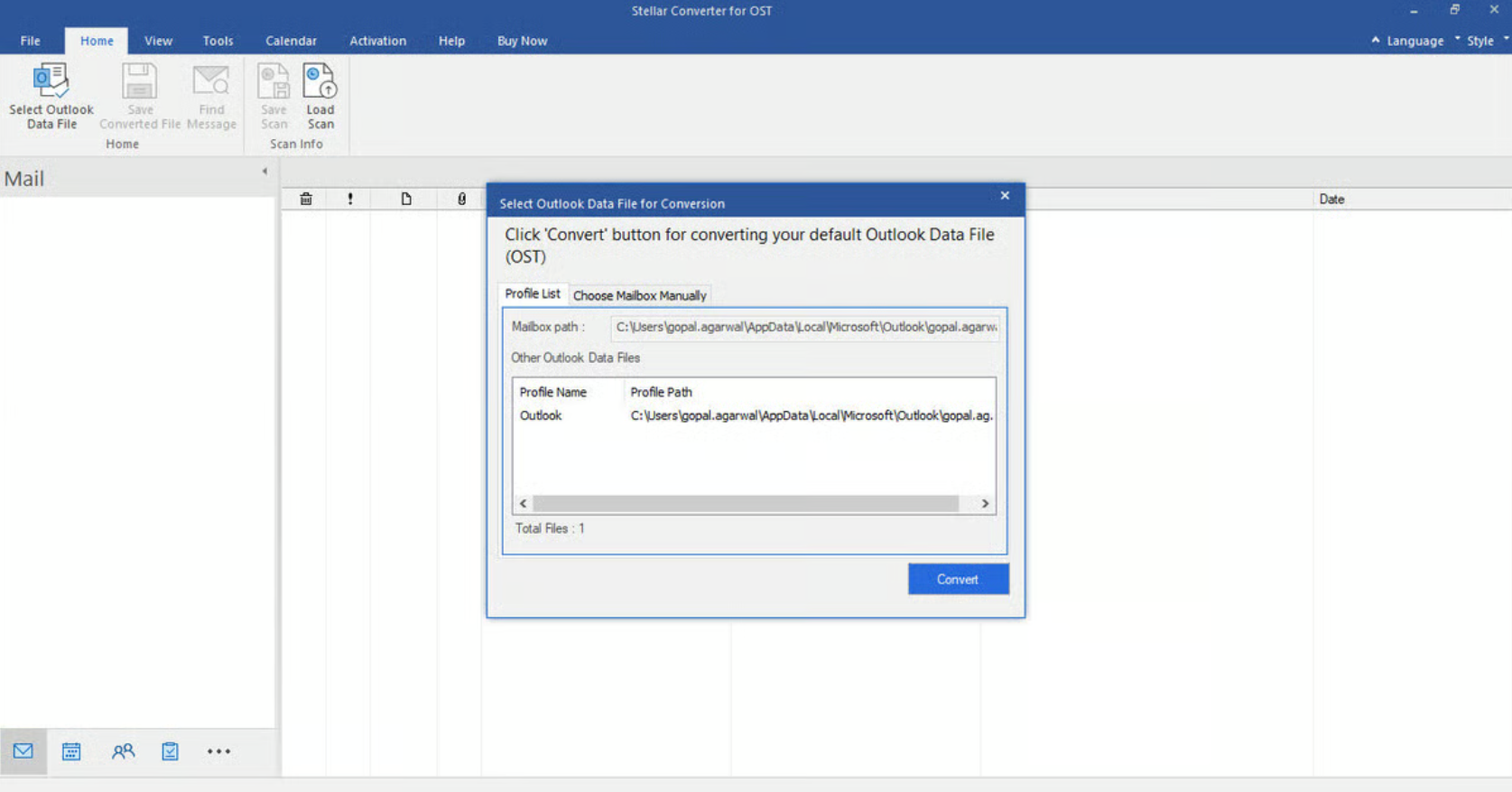
- Step 2: Choose the OST file – Launch the software, and tap “Browse” to find the OST file. You may also use the Find tool for easier access.
- Step 3: Convert the file – Tap the “Convert” button. The Stellar Converter will automatically scan and study the file, which may take time depending on the size of the file.
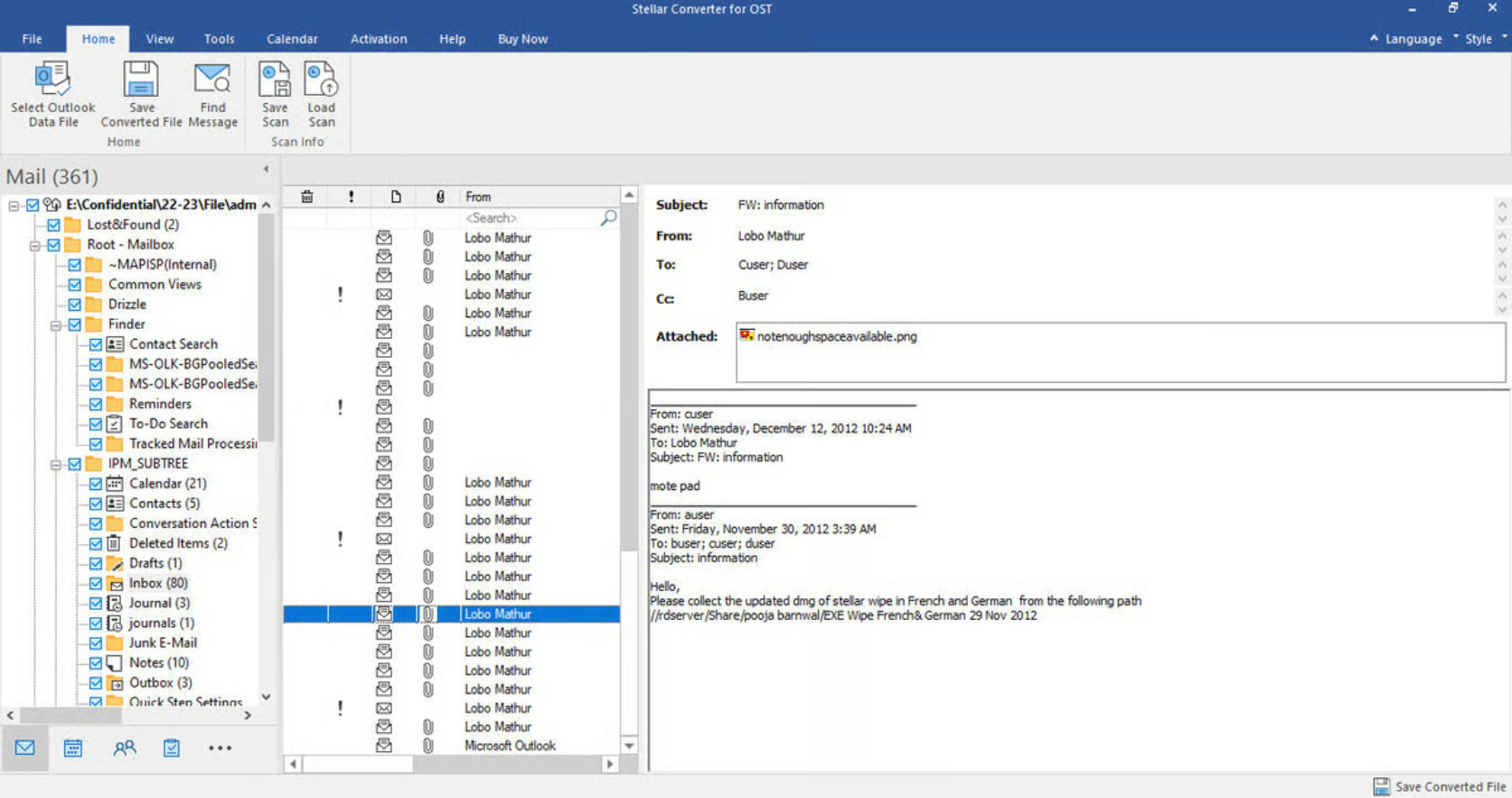
- Step 4: Preview the data – Following the conversion, the Stellar Converter software displays a view or preview of the mailbox content, allowing you to preview the emails, calendars, and other items.
- Step 5: Save as PST – Tap “Save Converted File” on the menu. Then, choose “Save as PST” and choose a destination folder for your new file.
- Step 6: Import to Microsoft Outlook – Time to see it live! Launch Microsoft Outlook, proceed to “File,” then “Open & Export,” then to “Import/Export” to import the newly-created PST file. And, you’re done!
In order to give you a clearer picture, here’s what the Stellar Converter for OST testing screen looks like:
Pros:
- Efficiently converts large OST files
- Preserves the integrity of original folder hierarchies
- Supports encrypted OST file conversions
- Offers several export file formats
- Auto-splits oversized PST files
- Batch converts several OST files
- Intuitive and navigable
Cons:
- The free version is limited
- Some features may require upgrades
Likeable Features of Stellar Converter for OST
Big Files, Big Conversion
Stellar Converter for OST is capable of handling large OST files in the most efficient way. It converts large OST files to PST quickly, helping when the Exchange Server crashes, OST is inaccessible, or in Outlook synchronization issues. It also seamlessly converts OST files to PST, and extracts the data with 100 percent precision.
Encrypted OST Files Conversion!
Encrypted files are almost always complex to understand. But this software makes it easy. When you need to open your encrypted OST file, errors may occur, resulting in the loss of access to the mailbox data. This tool provides the solution for this.
Auto-Location and Listing
This tool is also capable of locating and listing your OST files of IMAP, Exchange, or Microsoft 365 email profiles configured in Outlook. That said, you could quickly choose the OST file to scan and extract mail items. Plus, this OST to PST converter tool gives the opportunity to save those extracted mail items in PST or other formats supported. Or, go for the manual selection. Navigability, guaranteed.
Even Offline Data Files Are Covered!
No Internet? Don’t worry. You can still use this tool to perform the most precise OST and PST conversions, preserving the original integrity of your mailbox items. It’s the best solution for situations when you need to move or convert those files, but without your Exchange profile, since you need to be connected to the Internet.
Value for Money: Is It Worth It?
There’s a free download, and you could start using this tool, but the features and experience will be very limited. You can avail of the Corporate, Technician, and Toolkit plans for $79, $149, and $199, respectively.
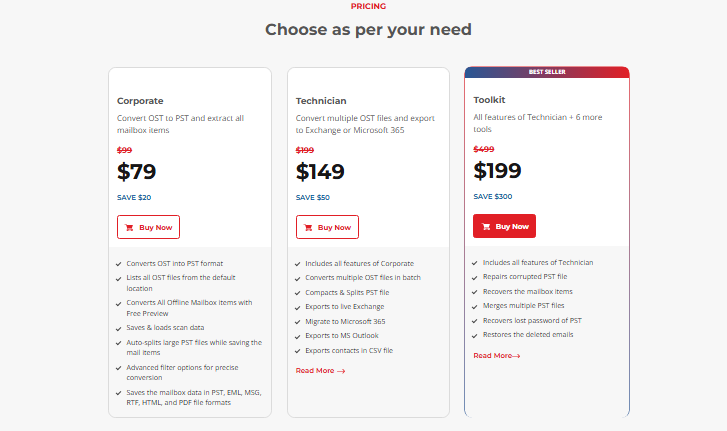
Those subscriptions give its consumers the access to scalable features, reliable conversion accuracy, and corporate-level tools. Overall, it is a cost-efficient product. However, it is recommended that you use your free trial slots first, before you dive right into the subscriptions.
The Verdict
Solid is the right word to describe Stellar Converter for OST, loaded with preserved structures and export options that are screaming that versatility. Converting files from one format to the other is very necessary in various instances, may it be for images or for email files. This software has all the features that go beyond what you see from free tools on Google. Substance is the name of the game.
Talk about the affordability? The pricing tier fits your needs. While you may have to upgrade to enjoy several other capabilities, its performance is dependable, and there’s also a reliable customer support to guide their users every step of the way. With this Stellar Converter for OST, productivity in the office is unstoppable.